Confused about linkedin sales navigator cost in 2025? You are not alone. With shifting pricing tiers, hidden discounts, and evolving features, it is easy to feel overwhelmed when choosing the right plan.
Selecting the right tier is critical for sales teams aiming to maximize results and ROI. The wrong choice can lead to missed opportunities or wasted resources.
This guide will break down every plan, feature, and cost-saving strategy, giving you a clear view of what you get for your investment. You will discover up-to-date pricing, feature comparisons, and actionable tips to maximize your return.
Use this guide to confidently select the best Sales Navigator plan for your business needs.
LinkedIn Sales Navigator Overview & Why It Matters in 2025
LinkedIn Sales Navigator has become the go-to B2B sales platform for teams looking to modernize outbound strategy. If you are evaluating the linkedin sales navigator cost, understanding what you’re paying for is vital. Sales Navigator’s advanced features, robust AI enhancements, and seamless CRM integrations set it apart in 2025.

What is LinkedIn Sales Navigator?
LinkedIn Sales Navigator is LinkedIn’s flagship tool for B2B sales professionals. Evolving from a simple prospecting add-on, it now offers deep lead search, account targeting, and advanced CRM integration. In 2025, the platform features AI-driven recommendations, real-time alerts, and expanded analytics—making the linkedin sales navigator cost a strategic investment for any team.
Key use cases include:
- Advanced lead and account search to pinpoint decision-makers.
- Automated alerts for job changes, funding rounds, or company news.
- Seamless CRM sync with platforms like Salesforce and HubSpot.
What sets Sales Navigator apart is its focus on high-value, trigger-based outreach. Compared to LinkedIn Premium, it offers more granular filters and team features, which you can further explore in this LinkedIn Premium vs Sales Navigator guide. Adoption is widespread—recent data shows most Fortune 500 sales teams leverage the platform for pipeline growth. For example, a SaaS sales team can instantly identify new buying signals and reach out at the perfect moment.
Who Should Use Sales Navigator?
Sales Navigator is designed for individual sales reps, small teams, and enterprise organizations aiming to maximize ROI. If the linkedin sales navigator cost concerns you, consider your outbound volume and workflow complexity. The tool is essential in industries like SaaS, B2B services, consulting, and recruitment, where precise targeting and timely outreach drive results.
Common pain points solved include:
- Inefficient prospecting and manual research.
- Missed outreach opportunities after key triggers, like fundraising events.
- Gaps in CRM data or lack of integration.
Teams using Sales Navigator often see up to 20 percent higher pipeline growth when leveraging features like trigger-based automation. For example, a B2B sales team can automatically surface prospects who just raised capital, then launch personalized campaigns. While Sales Navigator is overkill for low-volume, non-B2B teams, it’s indispensable when integrating outbound automation with human insight.
2025 Trends Impacting Sales Navigator Pricing & Usage
In 2025, linkedin sales navigator cost has shifted to reflect new value. Monthly and annual prices have increased, but so have feature sets. Expect more AI-powered lead recommendations, expanded CRM sync, and stricter usage limits. These changes align with the rise of AI SDRs and the demand for highly personalized, human-driven sales.
Key 2025 trends include:
- Enhanced trigger features for real-time outreach.
- Deeper analytics and compliance tools for enterprise users.
- Flexible pricing tiers that reward annual commitments.
Budgeting for Sales Navigator now requires a sharper understanding of plan differences and usage needs. As sales teams prioritize quality over quantity, investing in the right plan ensures sustained competitive advantage and measurable ROI.
LinkedIn Sales Navigator Pricing Plans Explained (Core, Advanced, Advanced Plus)
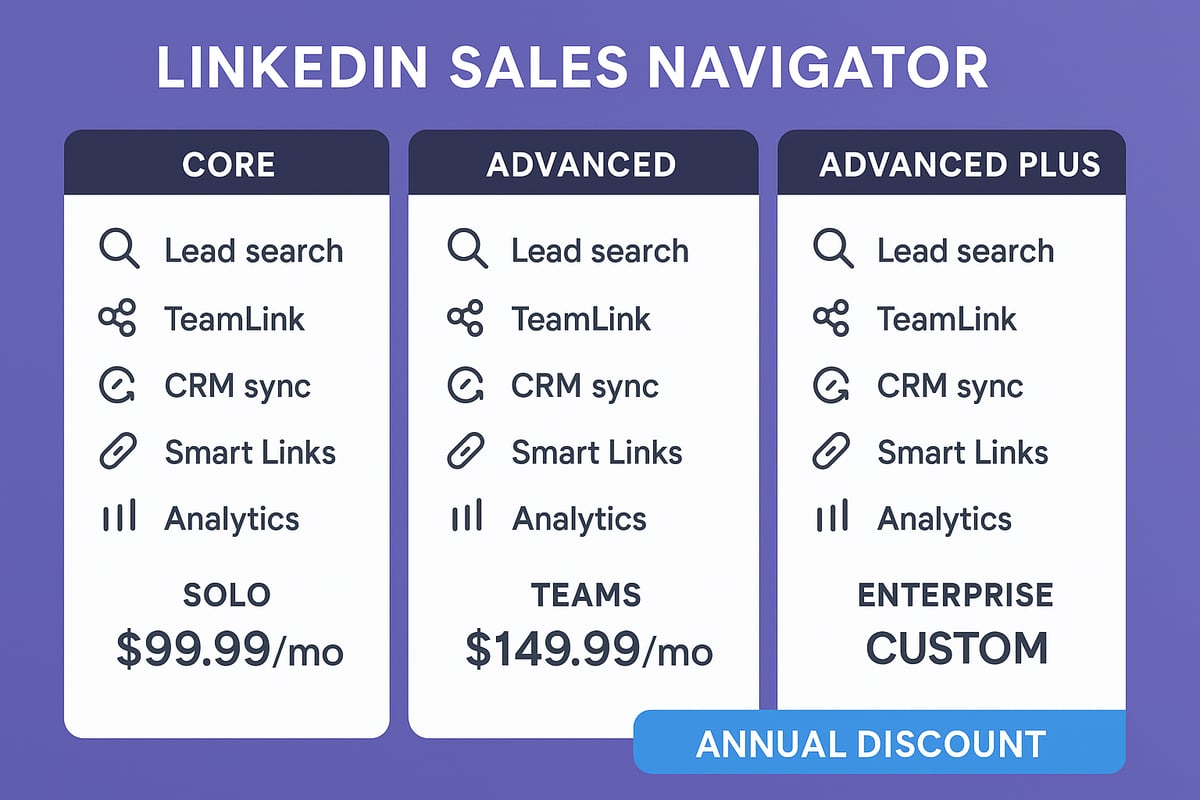
Navigating the linkedin sales navigator cost structure in 2025 can be complex, especially with new features and plan updates. Let’s break down what each plan offers, how much you’ll pay, and which features drive value at every level.
2025 Pricing Snapshot: Monthly & Annual Costs
Understanding linkedin sales navigator cost starts with a clear look at 2025 pricing. Here’s a quick comparison table:
| Plan | Monthly (USD) | Annual (USD/month) | Annual Total (USD) |
|---|---|---|---|
| Core | $99.99 | $79.99 | $959.88 |
| Advanced | $149.99 | $139.99 | $1,679.88 |
| Advanced Plus | Custom | Custom | Typically $1,600+/yr |
Annual billing brings about 20% savings versus monthly. For example, a 10-seat team on Advanced would save up to $2,400 per year by choosing annual payment.
Regional variations can affect final pricing, especially for global teams. Enterprises often negotiate bulk discounts or custom contracts for Advanced Plus.
To see the latest updates and a detailed breakdown of each plan, check out this LinkedIn Sales Navigator Pricing Breakdown 2025.
Solo reps, consultants, and small businesses usually start with Core, while scaling sales orgs gravitate toward Advanced or Advanced Plus. Always verify the linkedin sales navigator cost directly with LinkedIn, as occasional promotions or trials may apply.
Core (Professional) Plan: Features & Value
The Core plan is designed for individual sales professionals, consultants, and small business owners seeking to build their own pipeline. At $99.99 per month or $79.99 per month billed annually, it provides advanced lead and account search, saved searches, personalized lead recommendations, and real-time activity alerts.
You’ll also get 50 InMail credits monthly, which is key for reaching decision-makers outside your network. However, the Core plan lacks team collaboration features and has limited CRM integration, making it less suitable for larger teams.
For many, the linkedin sales navigator cost is justified if you close just one or two new clients monthly. Compared to LinkedIn Premium, Core unlocks deeper search filters, more robust lead tracking, and actionable insights that drive outbound success.
For example, a solo consultant can use Core to find new prospects, set up alerts for job changes, and message high-value leads directly. Most users start with Core before considering an upgrade, making it the entry point for maximizing LinkedIn’s sales potential.
Advanced (Team) Plan: Features & Value
The Advanced plan targets sales teams, agencies, and growing B2B organizations that need collaboration and visibility. Priced at $149.99 monthly or $139.99 per seat with annual billing, it builds on Core with powerful team features.
Key additions include TeamLink, which surfaces warm introductions through shared connections, and Smart Links for tracking recipient engagement. You can also upload leads via CSV, and enjoy basic CRM sync with Salesforce, HubSpot, and Microsoft 365.
Each seat gets more InMail credits, plus enhanced reporting and the ability to share lead and account lists. Teams using Advanced often report a 30% increase in connections via TeamLink, making the linkedin sales navigator cost per seat a smart investment for organizations seeking network-driven growth.
For example, a team of six can coordinate outreach, track prospect engagement, and leverage internal connections for warm intros, accelerating deal cycles. Upgrading to Advanced makes sense when collaboration and deeper insights become mission-critical.
Advanced Plus (Enterprise): Features & Custom Pricing
Advanced Plus is tailored for large enterprises and multi-regional sales teams that require advanced integrations and support. Pricing is custom, starting around $1,600 per seat per year, and varies based on organization size and feature needs.
This plan unlocks deep CRM integration with real-time data sync, TeamLink Extend, job change alerts, and advanced analytics. Dedicated onboarding and a personal account manager are included, ensuring smooth adoption.
For instance, an enterprise syncing LinkedIn data with Salesforce for 100+ reps can justify the linkedin sales navigator cost with improved data accuracy and compliance. To get a quote, book a demo with LinkedIn and negotiate based on seat volume and feature requirements.
Advanced Plus is the best fit for organizations where seamless CRM integration, compliance, and advanced analytics are non-negotiable.
Free Trials, Discounts, and Payment Options
Curious about how to get the most value from linkedin sales navigator cost in 2025? This section breaks down everything from free trials to billing, so you can make an informed decision and maximize your investment.
Is There a Free Trial in 2025?
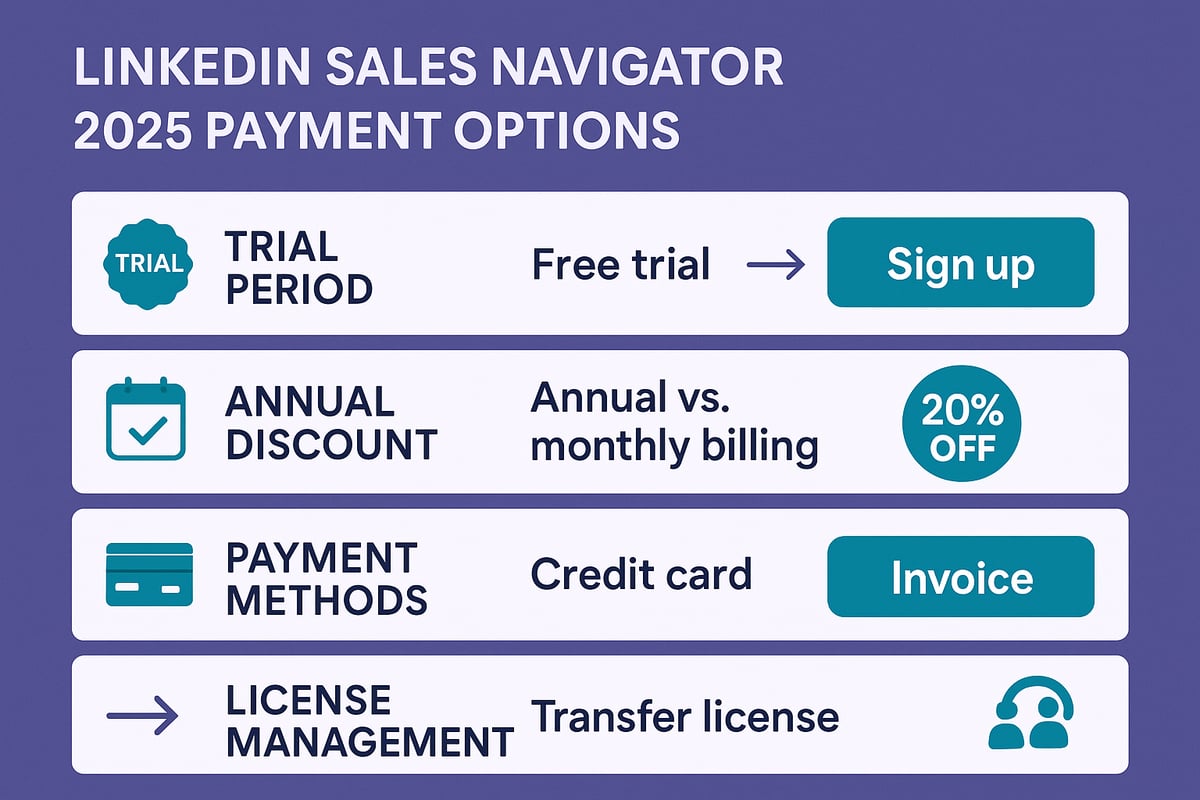
LinkedIn continues to offer a 30-day free trial for new users interested in exploring linkedin sales navigator cost and features. This trial is typically available for both the Core and, occasionally, the Advanced plans.
To qualify, you must be a first-time user or use a new LinkedIn account. During the trial, you get unrestricted access to all plan features, including advanced lead searches, InMail credits, and real-time alerts.
Getting started is as simple as visiting the Sales Navigator sign-up page, selecting your preferred plan, and entering payment details. Remember, you won’t be charged until the trial ends, so use this period to assess fit and value for your sales team.
Take advantage of the trial to test workflows, integrations, and see if the linkedin sales navigator cost aligns with your sales goals.
Are There Discounts or Promotions?
When evaluating linkedin sales navigator cost, it’s crucial to factor in available discounts. Annual billing offers an automatic 20 percent reduction compared to monthly pricing. LinkedIn occasionally runs special promotions, such as “2 months free” or bundled offers for new signups.
Enterprise customers can negotiate volume-based discounts, especially when purchasing 20 or more seats. Some organizations, like nonprofits or startups, may also qualify for additional savings, though these are subject to LinkedIn’s approval.
For a comprehensive breakdown of current pricing, plans, and deals, check out this LinkedIn Sales Navigator Cost & Pricing 2025 resource.
A SaaS startup, for example, recently secured a 10 percent discount for a 20-seat contract. Always inquire about available deals to ensure you’re not overpaying.
Payment Methods & Billing Cycles
Understanding how to pay for linkedin sales navigator cost is vital for smooth budgeting. LinkedIn accepts major credit cards for individual and small team purchases. Larger enterprises can opt for invoicing or bank transfer, which may be necessary for bulk seat orders.
You can choose between monthly and annual billing. Annual plans offer significant savings, but monthly billing keeps commitments flexible. Teams managing multiple seats benefit from centralized billing, making license management easier.
Switching from monthly to annual payments can be done mid-cycle within your account settings, often resulting in immediate cost savings.
How to Cancel, Pause, or Transfer a License
Managing your linkedin sales navigator cost also means knowing how to adjust your subscription as your needs evolve. To cancel, simply go to your LinkedIn account settings and select the cancelation option under your Sales Navigator subscription.
If you need a temporary break, pausing your license is possible, but be aware that access to saved searches and lists will be suspended until reactivation. Transferring a license to another team member is straightforward—admins can reassign seats from the team dashboard.
Refunds are rare and typically prorated based on how much of the billing cycle remains. For example, agencies often pause licenses during the off-season to control costs without losing access to historical data.
Cost vs. ROI: Is LinkedIn Sales Navigator Worth It?
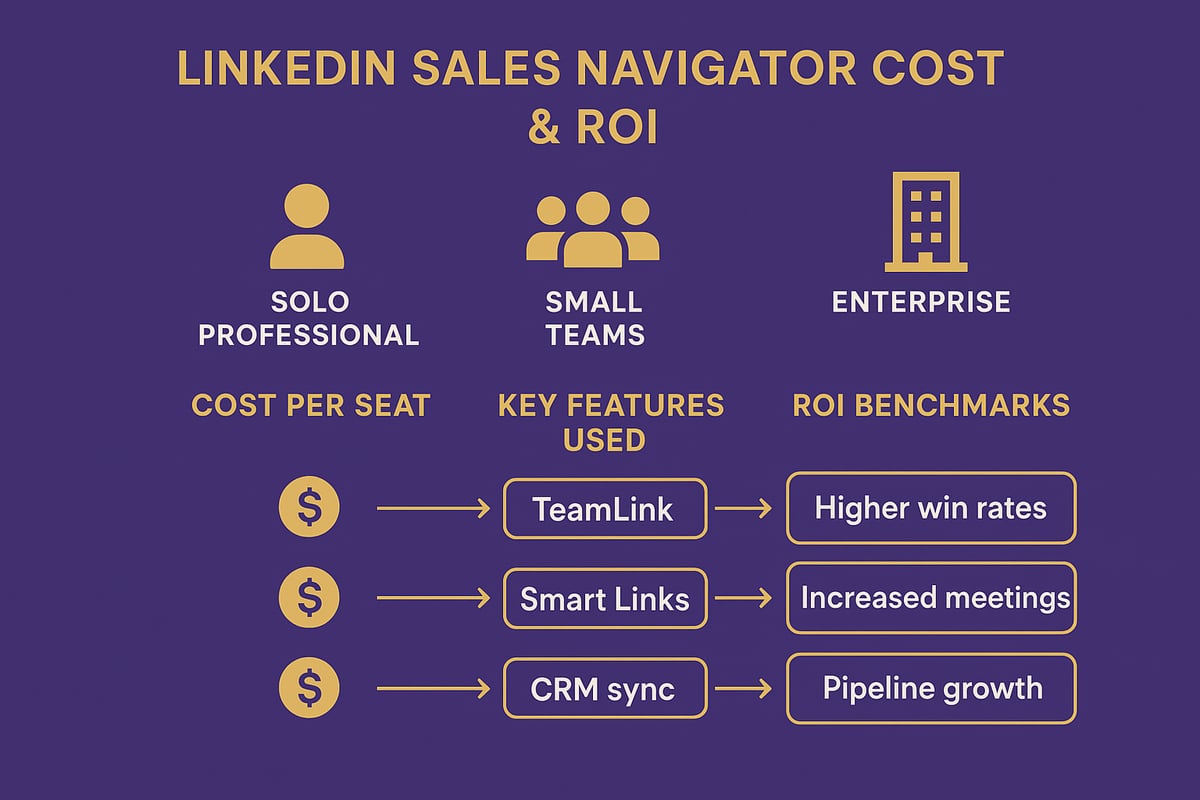
Evaluating linkedin sales navigator cost goes far beyond a simple price tag. To make a smart investment, you need to weigh the platform’s features, your team’s workflow, and the tangible impact on your pipeline. Let’s break down the ROI for different business sizes, the features that justify the spend, and real-world outcomes from companies leveraging Sales Navigator.
Cost-Benefit Analysis for Different Business Sizes
The linkedin sales navigator cost structure is designed to scale, but its value depends on your sales model. For solo users, the break-even point is usually just one or two closed deals per month. At $79.99/month (annual Core plan), even a modest win can cover your investment.
For small teams (5–10 seats), the linkedin sales navigator cost is offset by collaboration tools like TeamLink, which helps reps tap into the collective network. For example, a team of eight that closes two additional deals each month via TeamLink can see a rapid return.
Enterprises with dozens or hundreds of seats face a bigger upfront linkedin sales navigator cost, but get access to deep CRM integration, compliance features, and advanced analytics. Here, syncing LinkedIn data with Salesforce or HubSpot can save hours per week and improve pipeline accuracy.
| User Type | Monthly Cost/Seat | Key ROI Driver | Break-Even Benchmark |
|---|---|---|---|
| Solo | $79.99 | Lead search, InMail | 1–2 deals/month |
| Small Team | $139.99 | TeamLink, collaboration | 2+ team deals/month |
| Enterprise | $1,600+/year | CRM sync, analytics | 5–10% pipeline growth |
According to Forrester's 2023 Study on Sales Navigator ROI, organizations reported a 312% return on investment over three years. That data makes it clear: when used strategically, the linkedin sales navigator cost can be recouped quickly.
Key Features That Justify the Price
The true value behind the linkedin sales navigator cost comes from its advanced features, which directly improve sales productivity and outcomes. Here’s what sets it apart:
- Advanced Search Filters: Pinpoint decision-makers with laser precision using industry, company size, and recent activities.
- Trigger-Based Alerts: Get notified about fundraising, job changes, or press so you can reach out at the perfect moment.
- InMail Credits: Bypass gatekeepers and message prospects directly, increasing your chances of booking meetings.
- TeamLink: Leverage your team’s extended network for warm introductions, which convert at much higher rates.
- CRM Integration: Sync LinkedIn activities with Salesforce or HubSpot to keep your pipeline up to date and eliminate manual entry.
- Smart Links: Share content and track engagement, helping prioritize follow-up with genuinely interested leads.
These features dramatically increase the likelihood of timely, relevant outreach. When you factor in the time saved on research and data entry, the linkedin sales navigator cost becomes a clear investment rather than an expense.
Teams using trigger-based outreach and TeamLink report higher connection rates and more meetings booked. In competitive B2B spaces, these advantages can be the edge that justifies every dollar spent.
Real-World Use Cases & ROI Stories
What does ROI look like in practice? Consider the case of Canada Post, which achieved a staggering 58X return on their linkedin sales navigator cost by leveraging the platform for targeted prospecting and relationship building. You can read the details in the Canada Post's 58X ROI with Sales Navigator case study.
A SaaS startup might use Smart Links to track prospect engagement, leading to a 25% increase in response rates. Meanwhile, an agency using TeamLink for warm introductions could see five times higher conversion rates compared to cold outreach.
For larger organizations, monitoring job changes helps reduce churn and identify upsell opportunities. Many sales teams report that even a single large deal sourced through Sales Navigator more than covers the annual linkedin sales navigator cost.
Ultimately, the best results come from combining Sales Navigator with smart outbound automation and human-driven personalization. Teams that consistently use trigger-based outreach see double the reply rates, turning the linkedin sales navigator cost into a high-yield investment.
Pro Tips to Maximize LinkedIn Sales Navigator ROI in 2025
Looking to get the highest ROI for your linkedin sales navigator cost in 2025? With new features and usage rules, strategy matters more than ever. Below, discover actionable ways to turn Sales Navigator into a revenue engine for your team or business.
Automate Trigger-Based Prospecting for High-Value Outreach
Set up lead and account alerts in Sales Navigator to get notified when prospects hit key triggers like fundraising, hiring, or media coverage. Use saved searches with filters, then turn on real-time alerts for instant updates. For example, reach out right after a prospect’s funding round for maximum relevance.
- Use alerts for fundraising, hiring, or news mentions.
- Save searches to monitor target accounts.
- Integrate triggers with outbound tools for speed.
Human involvement is essential for personalization and quality. According to recent data, trigger-based outreach can boost conversion rates by 30 percent. Want more actionable ideas? Check out these Proven LinkedIn Outreach Tips to further increase your linkedin sales navigator cost efficiency.
Scrape & Export Lead Data Efficiently (and Safely)
While Sales Navigator’s native export tools are limited, you can use approved Chrome extensions or LinkedIn partners to export leads to CSV. Always follow LinkedIn’s terms to avoid any account risk. After exporting, you can upload these contacts to your CRM or outreach platform for campaign management.
- Use trusted tools for data export.
- Always review LinkedIn’s compliance guidelines.
- Export only necessary fields to stay efficient.
For example, exporting decision-maker lists lets you personalize campaigns. Staying compliant ensures your linkedin sales navigator cost delivers results while keeping your account secure.
Leverage Team Collaboration and TeamLink for Warm Intros
TeamLink, available in Advanced and Advanced Plus plans, lets you tap into your team’s collective connections for warm introductions. Set up TeamLink by inviting colleagues and sharing lead lists. Identify shared connections for targeted outreach.
- Share lead and account lists for joint campaigns.
- Request warm intros via 2nd and 3rd-degree connections.
- Coordinate efforts with regular team syncs.
A team of 10 can multiply their reach instantly by leveraging each member’s network, converting more leads and maximizing linkedin sales navigator cost value.
Using Smart Links and Engagement Tracking
Smart Links allow you to share content—like case studies or proposals—and track recipient engagement. See who clicked, for how long, and what they viewed. Use this data to prioritize follow-up actions with high-interest leads.
- Share personalized content via Smart Links.
- Monitor clicks and engagement metrics.
- Focus on leads who interact most.
For example, sending a Smart Link to a prospect and seeing strong engagement signals a great time to follow up. Smart Links users often see up to 20 percent more meetings, further improving linkedin sales navigator cost ROI.
Integrating with CRM for Seamless Workflow
Connect Sales Navigator to your CRM—like Salesforce, HubSpot, or Microsoft 365—for automatic lead and activity syncing. This integration eliminates manual data entry, keeps records current, and enables smarter pipeline decisions.
- Sync leads, notes, and activities automatically.
- Enable job change alerts for real-time updates.
- Use Advanced Plus for deeper analytics.
For a step-by-step guide to HubSpot integration, see How to Integrate HubSpot CRM. Integrating CRM ensures your linkedin sales navigator cost translates directly into pipeline growth.
Stay Within Usage Limits & Simulate Human Behavior
LinkedIn enforces daily and weekly usage caps for searches, InMails, and exports. To protect your account, stagger outreach and avoid aggressive automation. Simulate human activity by spacing out searches and messages.
- Track daily usage to stay under limits.
- Vary activity patterns for authenticity.
- Monitor account health with built-in tools.
Exceeding usage limits can lead to restrictions, risking your investment. Keeping activity natural safeguards your linkedin sales navigator cost and account access.
FAQs & Troubleshooting Common Issues
Can you switch plans mid-year? Yes, upgrades and downgrades are possible. Lead lists remain accessible after cancellation for a limited time. Limits exist on InMails, saved searches, and exports, depending on your plan. For billing or access issues, use LinkedIn’s support channels.
- Recover paused or expired licenses by contacting support.
- Manage license transfers between team members.
- Check plan features for specific caps.
Knowing how to troubleshoot ensures your linkedin sales navigator cost stays predictable, and you can focus on closing deals.