GTM Ecommerce Guide: Master Tracking Strategies for 2026

In ecommerce, precision is everything. As 2026 approaches, only the brands with robust tracking will outpace the competition. Are you prepared to leverage gtm ecommerce for actionable insights and sustainable growth?
This guide reveals how to master advanced tracking strategies using Google Tag Manager. You will learn the core principles, step-by-step setup for modern platforms, advanced event tracking, troubleshooting, and the trends shaping the future.
Get ready to unlock the full potential of your ecommerce data. The path to smarter decisions and competitive advantage starts here.
Understanding GTM Ecommerce Tracking: Core Concepts and Benefits
To thrive in ecommerce, you need more than just great products—you need precise tracking. GTM ecommerce is the backbone of modern analytics, helping you capture every crucial customer interaction. By understanding its core concepts and benefits, you can turn raw data into actionable insights for growth.
What is GTM Ecommerce Tracking?
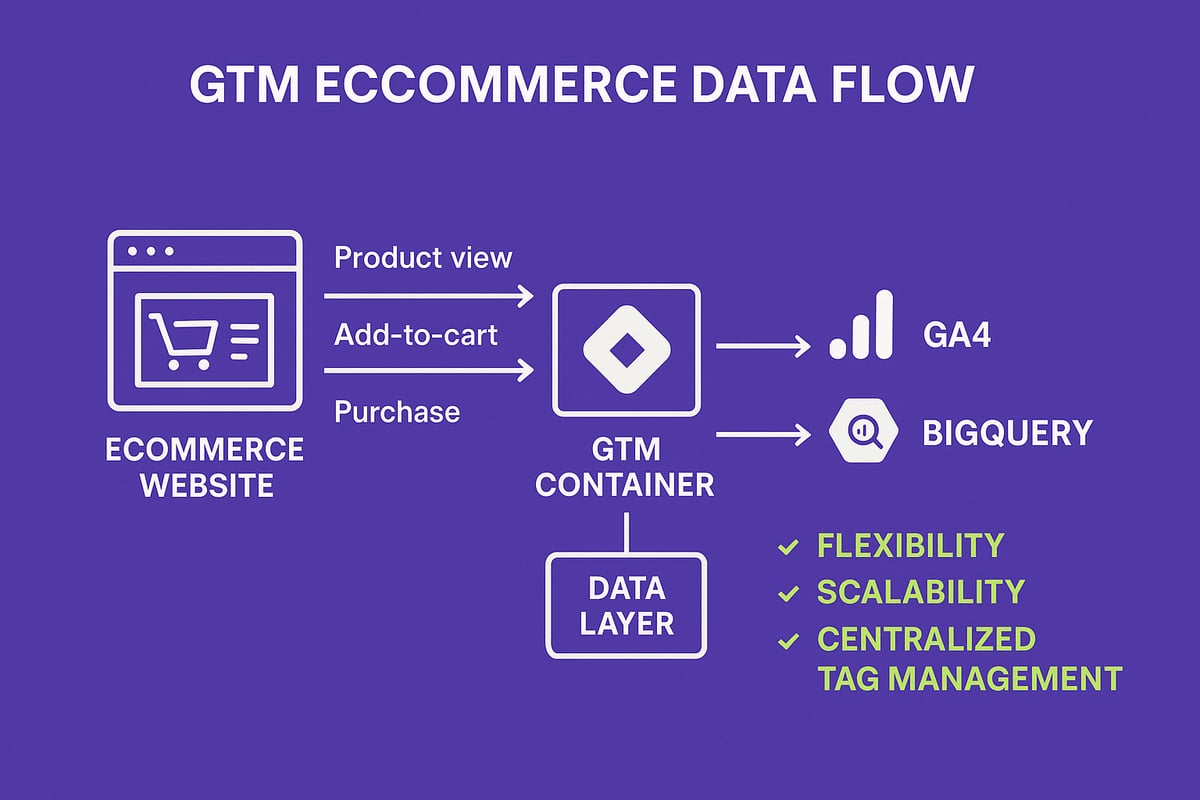
GTM ecommerce tracking refers to the process of collecting ecommerce data using Google Tag Manager as the central hub. GTM acts as the bridge between your website and analytics tools such as GA4. It listens for user actions, then fires events based on those actions—like product impressions, clicks, adds to cart, and purchases.
There are two primary approaches: basic ecommerce tracking, which focuses on essential actions like purchases, and enhanced tracking, which covers the entire shopping funnel, including product views and checkout steps. GTM ecommerce is event-driven and highly flexible, supporting both simple and complex data needs.
For instance, when a user views a product, GTM can push an object like this to the data layer:
window.dataLayer.push({
  event: 'view_item',
  ecommerce: { items: [{ id: '123', name: 'T-shirt', price: 29.99 }] }
});
To implement these features effectively, follow GTM Ecommerce Tracking Setup Guide for best practices on setup and data layers.
Why Ecommerce Tracking Matters in 2026
In 2026, ecommerce tracking is not just a nice-to-have—it is essential for survival. GTM ecommerce enables data-driven decisions, letting you optimize marketing spend and user experience with confidence. As privacy regulations tighten and browsers limit third-party tracking, first-party data becomes your main asset.
Real-time insights from GTM ecommerce help you stay ahead of competitors. According to OptimizeSmart, 81% of top-performing ecommerce brands rely on advanced tracking for growth. Imagine missing out on revenue because a key product click or purchase event was not tracked—those gaps can lead to big losses.
With GTM ecommerce, you are equipped to respond quickly to market shifts, adjust your inventory, and fine-tune your conversion strategies. This data-centric mindset is what sets industry leaders apart.
Core Benefits of Using GTM for Ecommerce
GTM ecommerce offers several compelling benefits that directly impact your business performance:
| Benefit | Description |
|---|---|
| Centralized Tag Management | Manage all tracking tags from one place |
| Speed and Flexibility | Deploy new events and pixels quickly |
| Improved Data Accuracy | Ensure consistency across analytics platforms |
| Scalability and Adaptability | Easily integrate with GA4, BigQuery, and more |
With GTM ecommerce, you reduce dependency on developers. Changes and new tracking events can be launched in minutes rather than weeks. This agility minimizes tracking errors, as seen in real-world cases where switching to GTM led to fewer data discrepancies and more reliable reporting.
Most importantly, GTM ecommerce is future-ready, allowing your analytics stack to evolve as new platforms and standards emerge. By mastering these fundamentals, your business stays prepared for whatever 2026 brings.
Step-by-Step GTM Ecommerce Implementation for Modern Platforms
Implementing gtm ecommerce tracking is the backbone of actionable analytics for modern online stores. Let’s break down the process step by step, ensuring you achieve accurate data and scalable insights.
Preparation and Planning
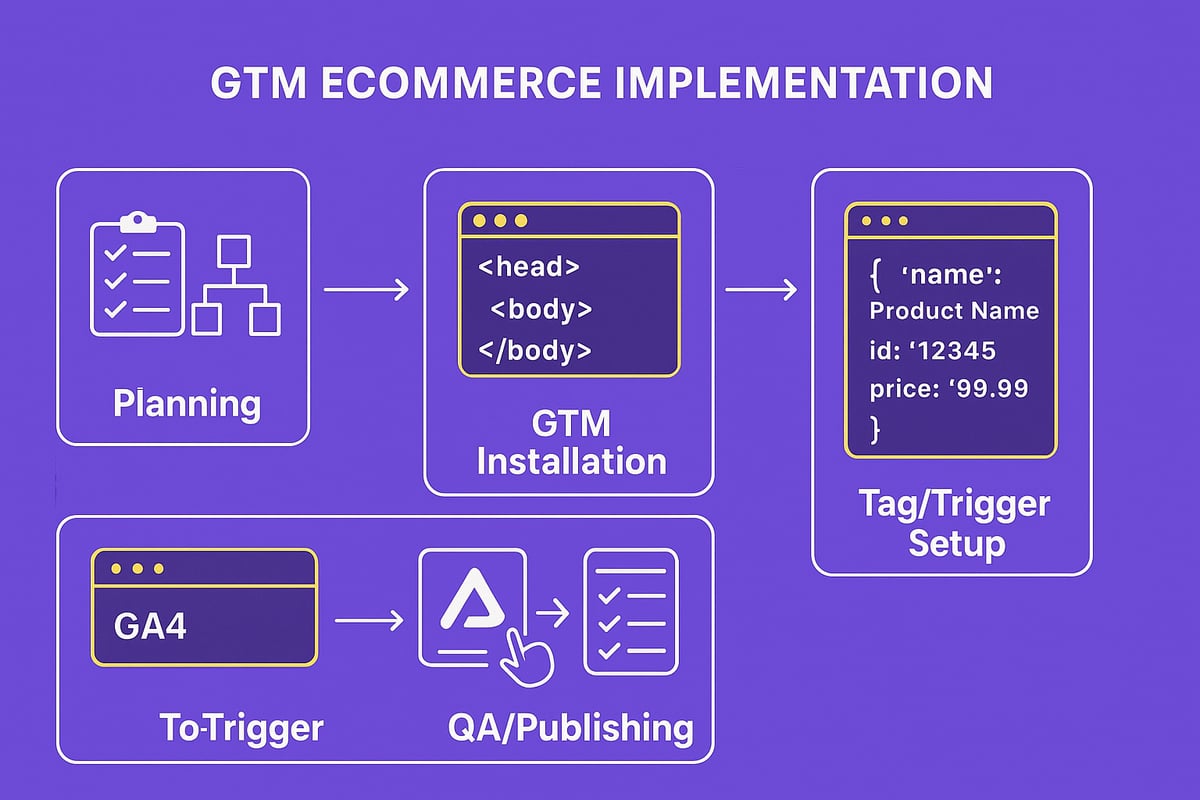
Every successful gtm ecommerce setup starts with a clear roadmap. Begin by auditing your current ecommerce data and aligning it with business goals. Identify the most critical events to track, such as product views, add-to-cart actions, checkout steps, completed purchases, and refunds.
Next, map your customer journey to spot all key touchpoints. Document a tracking plan that outlines which data you need at each step and how it will be captured. Detail your data layer specifications to ensure consistency.
Collaboration is essential. Involve developers and stakeholders from the start to avoid miscommunication and to streamline the implementation of your gtm ecommerce strategy.
Setting Up GTM on Your Ecommerce Site
Once you have your plan, install the GTM container code on your ecommerce site. Place the code snippets in both the head and body sections of your HTML as per Google’s guidelines. This ensures reliable firing of tags and events.
Check compatibility with your ecommerce platform, whether it’s Shopify, Magento, WooCommerce, or a custom build. Use GTM’s preview mode to confirm that the container loads correctly.
Be mindful of common installation mistakes, such as placing the code only in the head or missing updates when your site template changes. These pitfalls can cause your gtm ecommerce tracking to break or miss critical data.
Configuring the Ecommerce Data Layer
A robust data layer is the foundation of gtm ecommerce tracking. Define the structure for each event you want to capture, using clear, standardized naming conventions. For example, your data layer might look like this:
window.dataLayer = window.dataLayer || [];
window.dataLayer.push({
  event: "purchase",
  ecommerce: {
    transaction_id: "12345",
    value: 99.99,
    currency: "USD",
    items: [
      {
        item_id: "SKU-001",
        item_name: "Running Shoes",
        quantity: 1,
        price: 99.99
      }
    ]
  }
});
Ensure that data layer pushes happen at the right time, such as after a purchase or when a product is viewed. For detailed guidance, explore Data Layer Implementation Best Practices.
Creating Tags, Triggers, and Variables
Now, configure your GA4 ecommerce event tags in GTM. Set up triggers for each key action: view_item, add_to_cart, begin_checkout, purchase, and refund. Use variables to dynamically capture product details and transaction values.
For example, a tag for the 'Add to Cart' event should fire only when a user adds a product to their cart, pulling in the correct product data from the data layer. Test these tags using the Google Analytics Debugger extension to ensure accuracy.
A table can clarify which tags to use for common vs. advanced gtm ecommerce events:
| Event Type | Basic Tag | Advanced Tag Example |
|---|---|---|
| Product View | view_item | view_promotion |
| Add to Cart | add_to_cart | add_to_wishlist |
| Purchase | purchase | purchase with coupon |
Rigorous tag setup ensures your gtm ecommerce data is both comprehensive and reliable.
Validating and Publishing Your Setup
Before going live, follow a thorough QA checklist. Use GTM’s preview mode to monitor real-time events and validate that each tag fires as intended. Watch for common issues, like duplicate events, missing parameters, or incorrect triggers.
Compare your analytics data with your ecommerce platform to ensure consistency. Address discrepancies immediately to prevent inaccurate reporting.
Once validated, publish your GTM container. Implement version control so you can track changes and roll back if needed. This disciplined approach keeps your gtm ecommerce tracking robust as your store evolves.
Advanced Tracking Strategies for 2026: Beyond the Basics
The future of ecommerce analytics demands more than basic tracking. To truly master gtm ecommerce and outpace competitors, you need to capture every touchpoint, user action, and revenue event with precision. Let’s break down the advanced strategies that will set your tracking apart in 2026.
Enhanced Ecommerce: Tracking the Full Funnel
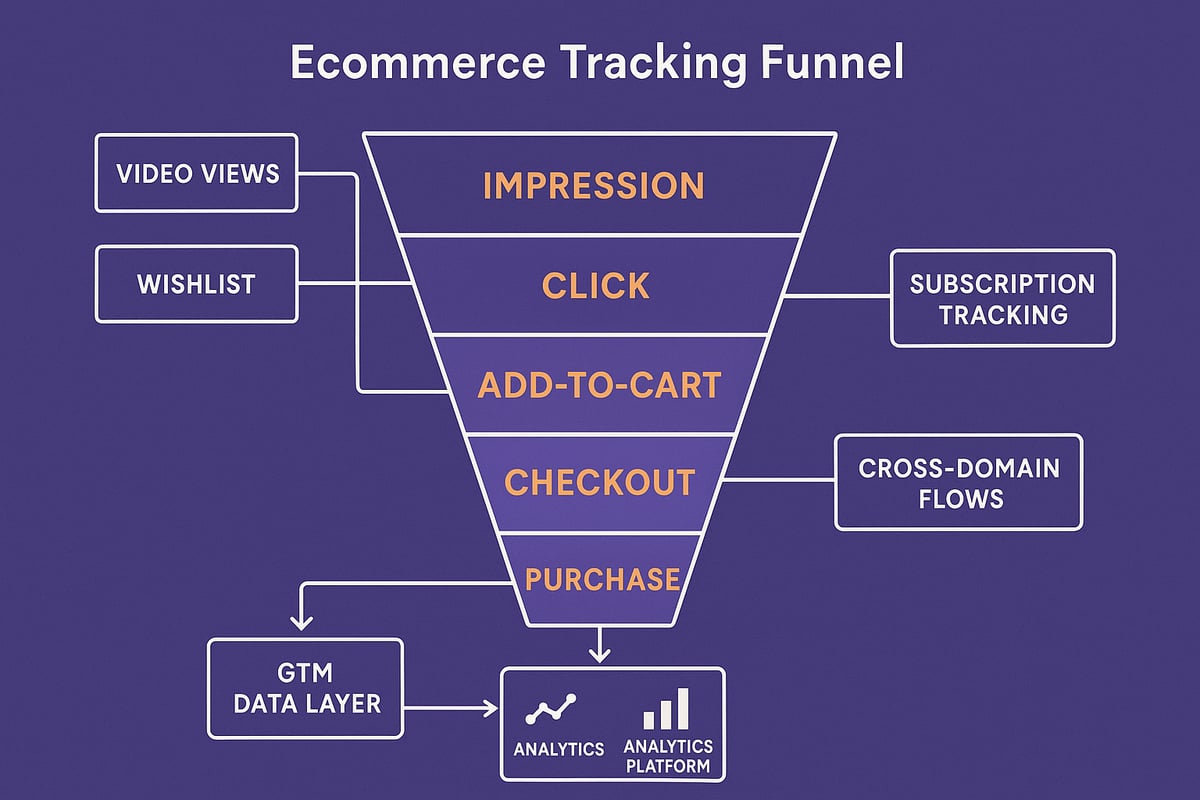
Enhanced ecommerce tracking with gtm ecommerce goes far beyond recording purchases. It enables you to map the entire customer journey, capturing key micro-conversions like wishlist additions, coupon redemptions, and internal promotions.
To fully visualize your funnel, track every checkout step. For example, set up GA4 events in gtm ecommerce for each stage: cart review, shipping selection, payment, and confirmation. This reveals drop-off points and optimizes conversion rates.
Here’s a simplified table for funnel step events:
| Funnel Step | GTM Event Name | Sample Trigger |
|---|---|---|
| View Cart | view_cart | Cart page load |
| Begin Checkout | begin_checkout | Checkout button click |
| Add Payment Info | add_payment_info | Payment form step loaded |
| Purchase | purchase | Thank you page load |
Tracking both product list views and detail views provides merchandising insights, showing which products attract attention but not purchases. For integration best practices and solutions to common pitfalls, see GA4 and GTM Ecommerce Integration Insights.
Custom Event Tracking and User Behavior Analysis
Unlock deeper user insights by setting up custom events in gtm ecommerce. Go beyond standard actions and track engagement metrics like video views, product reviews, and social shares.
Custom dimensions can segment audiences by behavior, such as users who filter products or use wishlists. For dynamic product lists, implement the addImpressions method in your data layer to capture scrolling and sorting actions.
Example dataLayer push for a custom event:
window.dataLayer.push({
  event: 'video_view',
  video_title: 'Product Demo',
  product_id: 'SKU123'
});
Monitoring these events in gtm ecommerce reveals what drives engagement and where users lose interest.
Cross-Domain and Multi-Channel Ecommerce Tracking
Modern ecommerce rarely lives on a single domain. With gtm ecommerce, you must ensure seamless tracking across payment gateways, subdomains, and even external checkout flows like PayPal or Stripe.
The challenge lies in maintaining session and attribution continuity. Always configure cross-domain measurement in both GTM and your analytics platform, passing client IDs and transaction data between domains.
Common pitfalls include missing transactions when users return from external gateways. To prevent this, use consistent event triggers and validate that all payment completion pages push the necessary data to the data layer.
A checklist for robust cross-domain gtm ecommerce tracking:
- Enable linker functionality in GTM tags.
- Test all payment and checkout flows.
- Validate session continuity in analytics reports.
Subscription, Recurring Revenue, and Refund Analytics
Ecommerce is rapidly shifting toward subscription and recurring revenue models. With gtm ecommerce, you can track signups, renewals, and churn events to understand true customer lifetime value.
Differentiate full and partial refunds by including clear parameters in your purchase and refund events. For example, use refund_amount and refund_type in your data layer pushes.
Here’s a sample refund event code:
window.dataLayer.push({
  event: 'refund',
  transaction_id: 'ORDER456',
  refund_amount: 25.00,
  refund_type: 'partial'
});
Analyzing this data in gtm ecommerce reveals how refunds impact revenue metrics and helps optimize retention strategies.
Avoiding and Fixing Duplicate Transactions
Duplicate transactions can severely distort your analytics. In gtm ecommerce, common causes include page reloads, delayed triggers, or users revisiting the confirmation page.
Prevent duplicates by implementing debouncing or throttling in your event triggers. For example, only fire the purchase event if it hasn’t already been sent for the same transaction ID.
A simple checklist for duplicate prevention:
- Store the last transaction ID in local storage.
- Fire purchase tags only on initial page load.
- Regularly audit sales data in your analytics platform.
A real-world case: One retailer resolved revenue discrepancies after deploying these fixes in their gtm ecommerce setup, ensuring every sale was counted once and only once.
Troubleshooting, QA, and Common Ecommerce Tracking Pitfalls
Staying ahead in ecommerce means more than just setting up tracking—it requires ongoing vigilance, troubleshooting, and smart quality assurance. Even experienced teams can fall into common traps that skew data and undermine business decisions. Let's break down the most frequent GTM ecommerce tracking pitfalls and how to avoid them.

Top Ecommerce Tracking Mistakes (and How to Avoid Them)
Mistakes in GTM ecommerce setups can lead to missing or inaccurate data. One of the most frequent issues is not capturing all relevant event parameters, such as product ID, price, or quantity. This can make revenue attribution unreliable.
Another pitfall is overlooking the event count per user. Failing to clear ecommerce data from the data layer after a transaction can result in duplicate purchases if a user reloads the page. Not involving developers or IT in planning and QA often leads to technical oversights.
A real-world scenario: a retailer missed thousands in reported revenue due to incomplete purchase event data. For a comprehensive look at tracking errors, see Common sales tracking mistakes.
Checklist of common mistakes:
- Missing event parameters in GTM ecommerce tags
- Not clearing the data layer after purchase
- Ignoring event frequency per user
- Skipping developer involvement in QA
Avoid these to ensure your GTM ecommerce data remains trustworthy.
Debugging and Quality Assurance Best Practices
Effective debugging is essential for reliable GTM ecommerce tracking. Use the Google Analytics Debugger extension and GTM’s built-in preview mode to validate each event.
Monitor real-time events in GA4 and GTM to see exactly what’s firing and when. Create a QA checklist to validate key ecommerce events like add_to_cart, purchase, and refund. Compare event data in analytics with your order management system for consistency.
QA steps for GTM ecommerce:
- Use preview mode to simulate user journeys
- Validate event parameters and triggers
- Cross-check analytics data with backend sales records
- Resolve mismatches promptly
Remember, regular QA cycles prevent small issues from becoming costly data gaps. GTM ecommerce implementations that prioritize QA maintain data integrity and support better business insights.
Handling Special Scenarios: Multi-Currency, POS, and Offline Events
Modern ecommerce operations often span multiple currencies, POS systems, and offline transactions. GTM ecommerce tracking must adapt to these complexities.
For multi-currency tracking, push currency codes with each transaction in your data layer (e.g., data-gtmcurrency). Integrate POS data into your analytics by syncing offline sales with online events, ensuring a complete revenue picture.
Offline conversions and refunds should be recorded in analytics to reflect true performance. Use unique identifiers to link online and offline events, preventing duplication.
Special scenario best practices:
- Always include currency and product details in data layer pushes
- Sync POS transactions with GTM ecommerce events
- Capture offline conversions using custom event tags
With these steps, your GTM ecommerce tracking covers every sales channel, providing actionable insights for growth.
Preparing for the Future: GTM Ecommerce Trends and Innovations for 2026
The world of gtm ecommerce is rapidly advancing, and futureproofing your tracking is no longer optional. To keep your analytics sharp and actionable, you must anticipate emerging trends and adapt your setup. Let's break down the key innovations shaping the future of gtm ecommerce, from privacy shifts to AI and new commerce channels.
Adapting to Privacy Changes and First-Party Data Emphasis
Privacy regulations and browser restrictions are rewriting the rules for gtm ecommerce tracking. GDPR, CCPA, and cookie limitations mean less reliance on third-party cookies and more on first-party data. To maintain robust tracking, many brands are moving to server-side GTM. This approach helps you control data flow and improve compliance.
For a deeper dive, see this Server-Side GA4 Ecommerce Setup Analysis to understand the benefits and considerations. Transitioning your gtm ecommerce to server-side ensures data integrity and prepares you for the next wave of privacy-first commerce.
AI and Automation in Ecommerce Tracking
AI is transforming gtm ecommerce by automating event detection, anomaly reporting, and even predictive analytics. Machine learning can spot trends in customer behavior that manual analysis might miss, allowing you to optimize faster.
Modern GTM containers are beginning to leverage AI for automated tag recommendations and error detection. Curious about real-world applications? Explore how AI and automation in sales are already revolutionizing ecommerce tracking and operations. With gtm ecommerce, you can expect smarter, more adaptive analytics workflows in the near future.
Integrating GTM with Modern Analytics Ecosystems
Gtm ecommerce is no longer just about sending data to Google Analytics. Today, advanced brands connect GTM to GA4, BigQuery, and other BI tools for unified reporting. Real-time dashboards and automated data exports make deep analysis possible.
You can use GTM to feed unified customer profiles, blending online and offline events. This integration supports advanced segmentation, attribution, and customer lifetime value analysis. As ecosystems grow, flexible gtm ecommerce setups will be essential for staying ahead.
Preparing for New Commerce Channels and Experiences
Ecommerce is expanding beyond traditional websites. Gtm ecommerce tracking must cover headless commerce, mobile apps, IoT transactions, and even AR or VR shopping. Each channel introduces unique data collection challenges.
Implementing GTM in progressive web apps (PWAs) or voice commerce requires creative solutions, such as custom event listeners and data layer enhancements. The future belongs to brands that can track across every digital touchpoint with a scalable gtm ecommerce approach.
Futureproofing Your Ecommerce Tracking Strategy
To thrive in 2026, your gtm ecommerce setup must be modular, well-documented, and ready for rapid change. Create a scalable GTM container, maintain clear documentation, and establish governance for consistent updates.
Regular training and continuous improvement cycles ensure your team adapts to evolving standards. By prioritizing flexibility and foresight, you can confidently navigate the changing landscape of gtm ecommerce and turn data into sustainable growth.
GTM Ecommerce Tracking Case Studies and Real-World Examples
Unlocking the full potential of gtm ecommerce takes more than just technical setup. Real-world examples show how advanced tracking drives growth, prevents revenue loss, and creates lasting competitive advantages. The following case studies and lessons reveal what’s possible when you put data at the center of your ecommerce strategy.
Success Stories: Ecommerce Brands Leveraging GTM
Brand X, a leading online retailer, transformed its business by adopting advanced gtm ecommerce strategies. By implementing enhanced tracking for product views, add-to-cart actions, and completed purchases, the brand saw a 15% increase in revenue within six months. This success was not just about the numbers, but about using data to optimize every step of the customer journey.
Enhanced checkout funnel analytics played a key role. By tracking each stage of the checkout process, Brand X identified where customers were dropping off and streamlined the experience. This led to a measurable reduction in cart abandonment rates.
Another retailer solved attribution gaps by fixing cross-domain tracking issues. Accurate session stitching across main site and payment gateways ensured marketing spend was properly credited, preventing wasted budget and missed opportunities.
Internal promotions also benefited from precise gtm ecommerce tracking. One brand saw a 20% boost in campaign ROI after tracking banner impressions and click-throughs. For more on the value of data-driven approaches, see Data-driven sales strategy insights.
Lessons Learned from Common Failures
Not every gtm ecommerce story begins with success. Some brands struggled with duplicate transactions, leading to overreported revenue. In one case, a simple page reload caused purchases to be counted twice, skewing financial reporting and marketing ROI analysis.
Missed product click data is another common pitfall. When event triggers were set up incorrectly, key engagement metrics vanished from analytics dashboards. This lack of visibility hurt merchandising decisions and hindered A/B testing results.
Ongoing quality assurance proved essential. Teams that neglected regular event validation often discovered mismatches between GA4 data and order management systems. The lesson is clear: robust QA and stakeholder collaboration are non-negotiable for sustainable gtm ecommerce tracking.
Actionable Takeaways for Your Ecommerce Business
To maximize returns from gtm ecommerce, follow this actionable checklist:
- Audit your current events for completeness and accuracy.
- Validate triggers and data layer pushes for every ecommerce action.
- Schedule recurring QA sessions to catch issues early.
- Collaborate closely with developers and analytics stakeholders.
- Document your setup and maintain clear version control.
Access official GTM resources, community forums, and advanced courses to deepen your expertise. Remember, ecommerce is evolving quickly. Iterating on your gtm ecommerce tracking keeps your business ahead of the curve and ready for whatever comes next.